
Building Modular Mobile Experiences with React Native and Re.Pack
- Authors

- Name
- Abhishek Thakur
- @abhi_____thakur
In today's fast-paced mobile world, user expectations are higher than ever. Apps need to be fast, small, and constantly evolving. But what if your app is a sprawling monolith with dozens of features, leading to slow load times, bloated download sizes, and a glacial update cycle dictated by app store reviews?
Enter the Super App Architecture—a paradigm shift that's transforming how we build and deploy large-scale mobile applications. This post dives deep into how you can leverage React Native with Re.Pack to create a modular, dynamic, and future-proof mobile ecosystem, tackling the common pain points head-on.
The Problem: When Your App Becomes a Monolith Monster
Imagine your app as a single, enormous house. Every new feature adds a new room, a new floor, or even an entire wing. Over time, this monolithic structure leads to several critical issues:
Bloated initial download size: Users are hesitant to download large apps. A massive initial download leads to abandonment, especially in regions with limited data or storage.
Slow updates and iteration: Every bug fix, every minor UI tweak, and every new feature requires a full app store submission and review process. This can take days, delaying crucial updates and slowing down your development velocity.
Increased build times: As your codebase grows, so do your build times, impacting developer productivity.
Team scaling challenges: Large, interconnected codebases become difficult for multiple independent teams to manage simultaneously without stepping on each other's toes.
Suboptimal performance: A large app might load unnecessary code and assets on startup, leading to slower launch times and higher memory consumption.
This is the "Monolith Monster" problem, and it's a significant bottleneck for ambitious mobile products.
The Solution: Modularization with React Native and Re.Pack
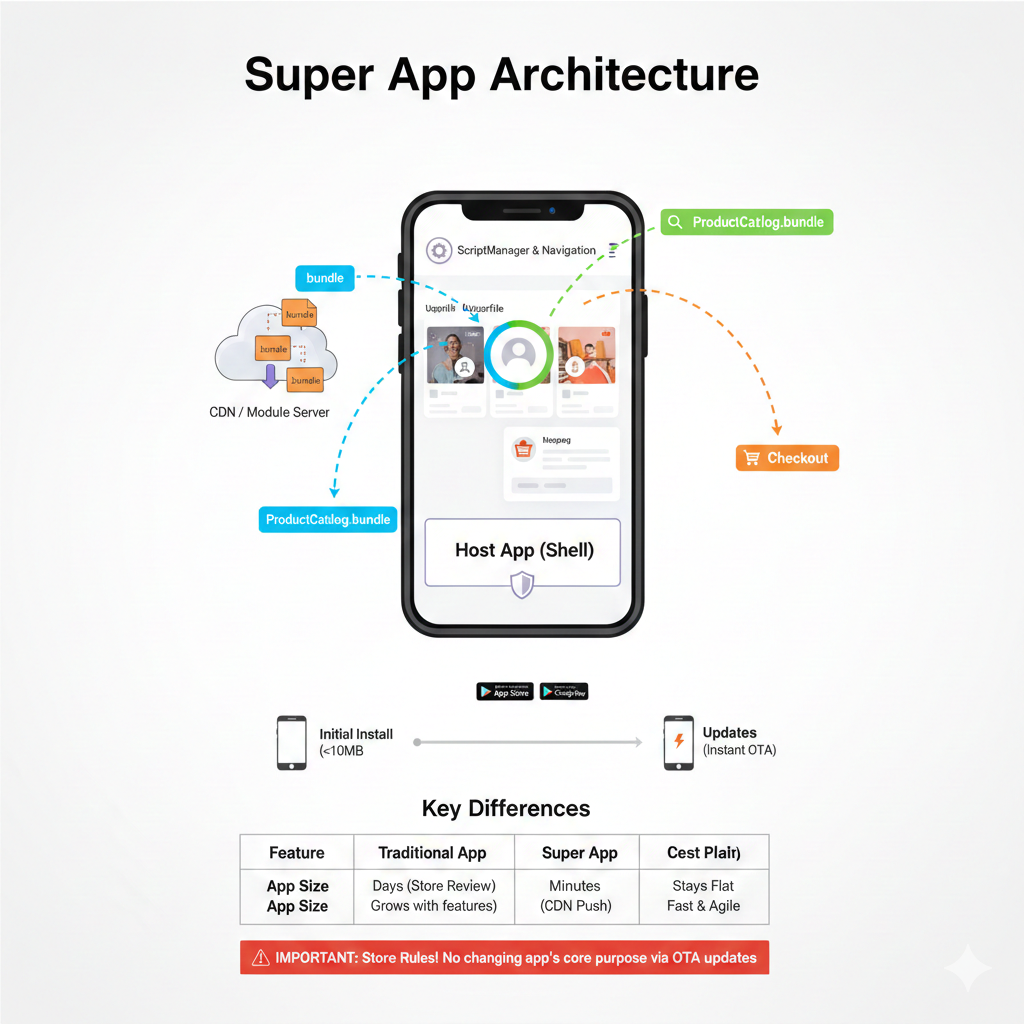
The Super App architecture breaks down the monolithic beast into a collection of smaller, independent Mini-Apps (or modules). Think of it like a flexible shopping mall: the main building (the "Host" app) provides the core infrastructure, and individual stores (the "Mini-Apps") are plugged in and updated independently.
React Native, with its promise of cross-platform development, is an excellent foundation for this. But the real game-changer here is Re.Pack—a powerful tool that replaces React Native's default bundler (Metro) with Rspack or Webpack, enabling Module Federation.
How it Works: The Host and the Remotes
The Host (Shell) App
This is the lean, core application you submit to the App Store/Play Store.
It contains essential services like navigation, authentication, and the crucial Re.Pack ScriptManager.
Its primary job is to provide the common infrastructure and then dynamically load other modules.
It remains small, ensuring a quick initial download.
The Mini-Apps (Remotes/Modules)
These are separate React Native projects, each representing a distinct feature (e.g., a "Product Catalog," "User Profile," "Checkout," or "Chat" module).
Each Mini-App is bundled separately and hosted on a CDN (Content Delivery Network) or your own server.
They are downloaded by the Host app only when a user needs them, similar to how web pages load content on demand.
The Magic of Over-the-Air (OTA) Updates
This is where the Super App truly shines. Because Mini-Apps are just JavaScript bundles hosted externally, you gain an incredible superpower: instant, Over-the-Air (OTA) updates.
Scenario: You discover a critical bug in your "Checkout" Mini-App.
Traditional method: Fix the bug, rebuild the entire app, submit to Apple/Google, wait for review (days), and then hope users update their app.
Re.Pack method: Fix the bug in the "Checkout" Mini-App, rebuild only that module, upload the new bundle to your CDN. The next time a user opens the app and navigates to the checkout, the ScriptManager fetches the updated module, and the fix is live—immediately, without any App Store intervention.
This dramatically accelerates your iteration speed, allowing you to react to user feedback, deploy A/B tests, and push hotfixes with unprecedented agility.
Key Benefits of the Re.Pack Super App Architecture
Smaller initial download size: Delight users with a lightning-fast download and install.
Rapid iteration and OTA updates: Deploy bug fixes and new features in minutes, not days or weeks.
Enhanced performance: Only load the code needed for the current screen, reducing memory footprint and improving startup times.
Scalable team collaboration: Different teams can own and develop separate Mini-Apps independently, reducing dependency conflicts and accelerating development.
Improved code organization: Enforce cleaner module boundaries and encourage reusable components.
Future-proofing: Easily introduce or deprecate features by simply managing their availability on your CDN.
Here's an illustration of how the modules load:
Under the Hood: The Re.Pack ScriptManager
The ScriptManager is the brain of your Super App. It's a client-side component within your Host app responsible for:
Resolving script IDs: When your app tries to render a component from a remote module, the ScriptManager intercepts the request.
Fetching bundles: Based on the script ID, it constructs the URL to the Mini-App's bundle on your CDN.
Caching: It intelligently caches downloaded bundles locally, so users only download them once (per version) and can use modules offline.
Execution: It loads and executes the JavaScript bundle into the running React Native environment.
// Example in your Host App's index.js or a dedicated setup file
import { ScriptManager, Script } from '@callstack/repack/client'

// Configure the ScriptManager to know where to find your modules
ScriptManager.shared.addResolver(async (scriptId) => {
  // In a real app, you'd have more sophisticated versioning and environment handling
  const getModuleUrl = (id) => {
    // Example: For production, fetch from CDN
    if (process.env.NODE_ENV === 'production') {
      return `https://your-production-cdn.com/modules/${id}.bundle`
    }
    // Example: For development, fetch from local dev server
    return `http://localhost:8081/${id}.bundle` // Or your dev IP
  }

  return {
    url: Script.getRemoteURL(getModuleUrl(scriptId)),
    cache: true, // Cache the module on the device for subsequent use
    // integrity: 'sha256-...', // Optional: For content integrity verification
  }
})

// Later, in your navigation or component that uses a remote module:
const RemoteUserProfile = React.lazy(() => import('user_profile_module/Main'))

// ... render <RemoteUserProfile />
Critical Limitations and Considerations
While powerful, the Super App architecture isn't a silver bullet. Be aware of these key limitations:
Native Module Dependency
Rule: Any native code (Java/Kotlin for Android, Objective-C/Swift for iOS) required by a Mini-App must already be present in the Host app's binary.
Impact: If a new Mini-App needs a brand new native dependency (e.g., a specific hardware API or a unique payment SDK), you will need to update the Host app in the stores. OTA updates are for JavaScript logic and assets only.
Mitigation: Design your Host app to include common native dependencies upfront, or abstract native interactions through a shared native bridge.
Shared Runtime (Singleton Issues)
Rule: React, React Native, and other core libraries must be treated as singletons. The Host and all Mini-Apps must use the exact same instance and version of these libraries.
Impact: If a Mini-App is bundled with a different version of React than the Host, it will likely crash.
Mitigation: Enforce strict versioning across your Host and Mini-App projects, ideally by sharing a package.json for core dependencies or using automated checks. Re.Pack's Module Federation shared configuration helps manage this.
Complexity and Tooling
Setting up Module Federation with Rspack/Webpack is more complex than a standard Metro-based React Native project. It requires a deeper understanding of bundler configurations.
Debugging distributed modules can be challenging.
Deployment and CDN Management
You'll need a robust CDN strategy for hosting and versioning your Mini-App bundles.
Rollbacks need to be carefully planned.
Initial Load Time of First Module
While the initial app download is small, the first time a user accesses a new module, there might be a slight delay as the bundle downloads.
- Mitigation: Implement loading indicators, pre-fetch critical modules in the background, or use smart caching strategies.
The App Store Rules: A Crucial Warning
This is perhaps the most important section. Both Apple's App Store Review Guidelines and Google Play's Developer Program Policies have strict rules about dynamic code execution and app behavior.
What Is Generally Allowed (with Re.Pack)
JavaScript/logic updates: You are generally permitted to push new JavaScript code, UI changes, bug fixes, and feature enhancements via OTA updates. This is considered acceptable as long as it doesn't change the app's core purpose.
Asset updates: Images, fonts, and other static assets can also be updated dynamically.
What Is Strictly Forbidden (and Will Lead to Rejection or Ban)
Changing the app's core purpose: You cannot use dynamic modules to fundamentally alter the app's functionality or purpose after it has been approved. For example, submitting a "Weather App" and then dynamically loading a "Gambling App" module is a guaranteed ban. The app's primary function as described in its store listing must remain consistent.
Introducing new native code: You cannot dynamically download and execute new native libraries or binaries that were not part of the original app binary submitted to the store.
Obfuscated or malicious code: Any dynamically loaded code must adhere to all platform security and privacy policies.
Our Recommendation
Always clearly communicate the breadth of your app's features (including potential future modules) in your App Store submission. Avoid any language that suggests the app's functionality could change wildly. It's best to frame it as "dynamic content updates and feature enhancements."
Conclusion: The Future Is Modular
The Super App architecture with React Native and Re.Pack offers a compelling vision for modern mobile development. It empowers teams to build faster, deploy quicker, and deliver more performant, engaging experiences to users. While it introduces a layer of complexity, the benefits in terms of agility, scalability, and user satisfaction are often well worth the investment.
By understanding the technical nuances and respecting the crucial app store guidelines, you can leverage this powerful approach to unlock the true potential of your mobile product and stay ahead in the ever-evolving app ecosystem.